

Session Expired
The ACE Alliance platform includes automatic session expiration monitoring to enhance security and improve user experience when authentication tokens expire.
Overview
When a user's session expires (typically due to an authentication token timing out), the platform automatically detects this condition and displays a modal dialog to inform the user and prompt them to re-authenticate.
How It Works
The session expiration monitoring is implemented at the TRPC client level across all applications. When any API request returns a 401 Unauthorized status code, the system:
- Detects the 401 response in the TRPC client's fetch interceptor.
- Triggers the
session-expiredcapability from the notifications app. - Displays a modal dialog informing the user that their session has expired.
- Provides a "Log In" button that reloads the page to restart the authentication flow.
User Experience
When a session expires, users will see this modal:
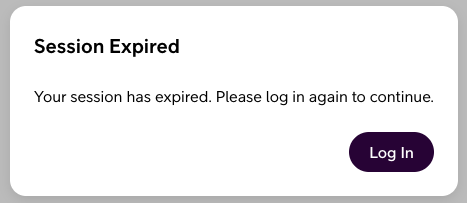
The modal:
- Cannot be dismissed (it's a required modal) - ensuring users are aware their session has ended.
- Provides clear messaging - explains that the session has expired.
- Offers a simple action - a "Log In" button to reload the page and re-authenticate.
- Prevents duplicate modals - only one session expired modal can be shown at a time.
TRPC Client Integration
Each app's TRPC client has been enhanced to monitor response status codes:
typescript
async fetch(input, init) {
    const response = await fetch(createRequest(<string>input, init));
    if (response.status === 401) {
        runCapability('notifications', 'session-expired', {});
    }
    return response;
}
Benefits
- Improved Security - Users are immediately notified when their authentication is no longer valid.
- Better User Experience - Clear communication prevents confusion when API requests start failing.
- Prevents Errors - Users can't continue attempting actions with an invalid session.